Choosing the right Acoustic Screens can transform a noisy office into a calmer, more focused workplace. These screens help separate desks, soften nearby conversations, and reduce visual distractions. However, they are not a complete soundproofing solution. Their performance depends on height, material, placement, and the room’s existing surfaces.
The best options usually combine dense acoustic fabric, recycled PET panels, or perforated materials with sound-absorbing cores. A desk-mounted screen may suit shared workstations, while a tall freestanding panel can create a quieter focus zone. Look closely at laboratory-tested absorption ratings, product durability, cleaning requirements, and installation stability. A screen that looks attractive but moves easily may become frustrating during daily use. Small details matter.
Room conditions matter too. Hard floors, glass walls, and exposed ceilings can reflect sound, reducing the benefit of individual screens. In practice, combining Acoustic Screens with ceiling panels, soft flooring, and sensible workstation spacing often produces better results. Yet every office is different. A product praised in one open-plan space may perform poorly in another. This guide compares leading screen types, practical applications, and important specifications to help office managers make a more informed decision. It also considers comfort, privacy, flexibility, and long-term value. The “best” screen is rarely the most expensive one. It is the option that fits the room, the people, and the work.
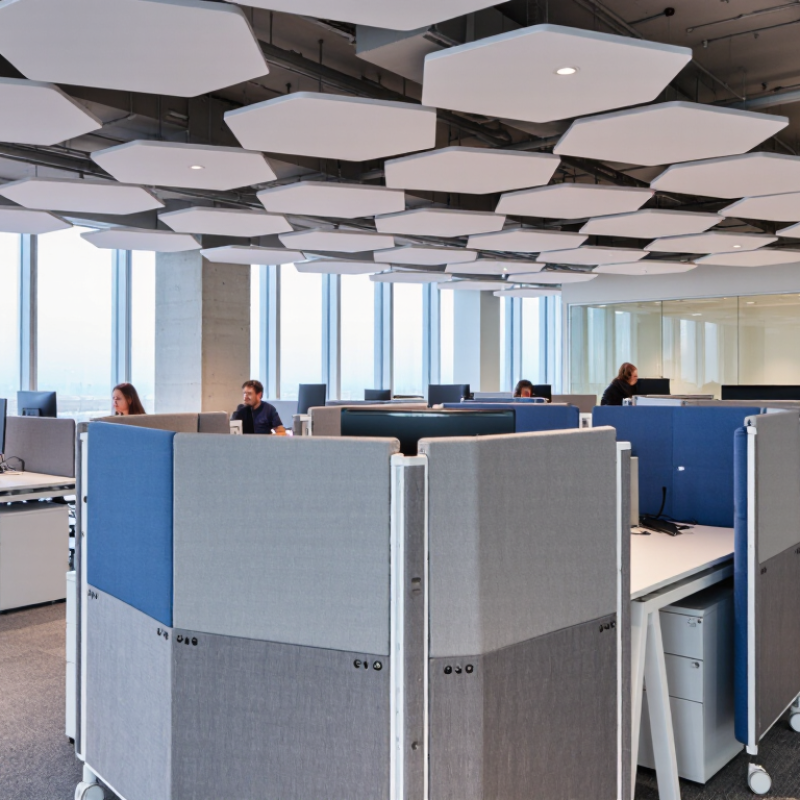
Modern offices use several types of acoustic screens, and each solves a different noise problem. Desktop screens sit between coworkers and reduce nearby speech, keyboard sounds, and visual distraction. They work well in open-plan workstations, especially when panels rise above seated head level. However, a thin panel may offer privacy without controlling much sound.
Freestanding acoustic screens create flexible zones around desks, meeting corners, or reception areas. Many have dense cores and fabric surfaces that absorb reflected noise. Mobile versions include casters, so teams can reshape a room during workshops or busy periods.
Folding screens provide stronger separation, but they can occupy valuable floor space. I have found that heavy, stable frames perform better than lightweight panels in active offices.
Ceiling-hung screens are useful where floor space is limited. They interrupt sound travelling across large rooms and can soften echoes near hard ceilings. Workstation panels offer a more permanent solution, while suspended baffles target reverberation above shared tables.
These systems should be selected after checking ceiling height, speech patterns, and furniture layout.
Absorption is not the same as soundproofing. That distinction matters.
A practical assessment includes listening at different times of day. Morning noise may differ from afternoon collaboration. Office surveys, reverberation measurements, and manufacturer test data can guide decisions, but real conditions remain imperfect.
Even attractive screens may fail when installed too low, too sparsely, or beside reflective glass. Trial panels are often worth the inconvenience.
What Are the Top Acoustic Screens for Offices?
How Office Acoustic Screens Reduce Noise and Improve Privacy
Office acoustic screens help control sound without building permanent walls. They absorb speech, reduce reflections, and create clearer boundaries between desks. This matters in open-plan spaces, where phone calls and keyboard noise travel easily. Harvard Business Review reported that face-to-face interactions fell by 70% in one open-office study, while email use increased by 56%. The study does not prove that every open office fails. Still, it shows how workplace design can change communication.
The most useful screens combine dense acoustic cores, fabric surfaces, and sufficient height. Desk-mounted panels suit focused workstations. Freestanding screens work better around shared tables or meeting corners. For privacy, look beyond noise reduction ratings. A screen should also block direct sightlines and soften nearby speech. Acoustic performance depends on room size, ceiling height, furniture, and placement. One screen rarely fixes everything. That is an easy detail to underestimate.
Tips: Place screens between speakers and listeners, not randomly around desks. Leave small air gaps where possible. Use absorptive ceilings and wall panels with screens. The WELL Building Standard recommends assessing sound through measurable background noise, reverberation, and speech privacy. Ask for test data before purchasing, and compare laboratory results with real office conditions. A quiet-looking screen may provide limited privacy if voices still pass above it. Trial one section first; employee feedback may reveal problems that specifications miss.
Choosing an acoustic screen starts with the problem you need to solve. Desk screens reduce nearby speech and keyboard noise. Floor-to-ceiling panels provide stronger visual separation and improve privacy. In an open office, I have found that height matters as much as material. A low panel may look neat, but it may not block conversation at seated ear level.
Compare acoustic performance using tested absorption data, such as the Noise Reduction Coefficient. Do not rely only on phrases like “sound absorbing.” Check the panel’s thickness, density, coverage, and installation method. Recycled felt can perform well, but its results vary between constructions. Small gaps around panels can also reduce their practical effect. This detail is often overlooked.
Look closely at the frame and fixing system. A stable base prevents movement when people pass nearby. Rounded edges reduce accidental knocks, while stain-resistant surfaces simplify daily cleaning. Fire performance, indoor air quality, and material transparency also deserve careful review. Ask for independent test documents when available. They make comparisons more reliable.
Flexibility matters too. Modular screens can follow changing desk layouts, but movable parts may feel less solid. I once saw a beautiful screen system fail because its feet occupied too much floor space. A quieter office is useful, but not at the cost of safe circulation. Measure the room first. Then compare appearance, acoustic data, durability, maintenance, and total installation effort.
Open-plan offices need acoustic screens that reduce speech spread without blocking teamwork. Freestanding desk screens suit shared benching layouts. Choose panels that rise above seated head height. A 450–600 millimetre extension often improves speech privacy near workstations. Fabric-wrapped panels with sound-absorbing cores usually perform better than thin decorative dividers. Check the product’s acoustic rating, such as its Noise Reduction Coefficient, rather than judging thickness alone.
For small team zones, suspended ceiling baffles can control reflected sound overhead. Combine them with low screens around desks or meeting tables. This arrangement keeps sightlines open while softening voices and keyboard noise. In private offices, wall-mounted panels work well behind video-call desks. Place them near the speaker’s voice path. Glass offices need special care. Transparent acoustic partitions preserve daylight, but they may need seals and ceiling treatment to limit sound leakage.
Flexible offices benefit from mobile screens with locking casters. They can separate focus areas during busy periods, then move for workshops. I have found that poorly positioned screens create visual clutter without improving comfort. Placement matters more than quantity. Leave airflow clear around screens, and avoid placing them directly beside noisy printers. Measure the room before ordering. Simple sound checks during occupied hours can reveal problems that product specifications miss. No screen fixes every issue. Furniture, ceiling height, and staff behaviour still influence the result.
Choosing an acoustic screen starts with the noise problem, not its appearance. Desk screens suit shared workstations and reduce direct speech between nearby colleagues. Freestanding screens work better for temporary zones, meeting corners, or flexible teams. Ceiling-hung panels help control reflected sound across open ceilings. Select a dense, absorbent core with a tested acoustic rating, but do not treat one number as the whole answer. Thickness, height, coverage, and installation gaps also affect performance.
Position each screen between the noise source and the listener. Place it close to the desk edge, with enough height to interrupt the direct sound path. A screen that stops below ear level may offer limited privacy. Avoid leaving wide gaps between connected panels.
For conversation areas, combine screens with wall or ceiling absorbers. Hard floors and bare glass can still return sound into the workspace. The room needs balance.
Measure before making large changes. Record speech levels near desks during busy periods, then test one screen arrangement for several days. Notice whether voices become less distracting without making the room feel closed. Screens will not remove printer noise, footsteps, or low-frequency equipment sounds completely. That expectation is worth correcting.
They absorb speech, soften reflections, and reduce keyboard noise between nearby desks. They do not make the room silent. Not a complete fix.
Yes, taller panels can block direct sightlines across desks and shared tables. A low screen may still leave faces and documents visible.
Choose a height that blocks sound and views at seated ear level. The right height depends on desks, chairs, and room layout. Height matters greatly.
They suit individual workstations and can reduce nearby conversations. They work less effectively around large shared tables or busy walkways.
Place them between speakers and listeners, rather than randomly around desks. Positioning matters. Leave small air gaps when practical.
Review tested absorption data, panel thickness, density, coverage, and installation method. Do not rely only on “sound absorbing” descriptions. Test results can vary.
Usually not. Room size, ceiling height, furniture, and wall surfaces also affect sound. Combined treatment often performs better than one isolated panel.
Check stable bases, rounded edges, cleaning needs, fire performance, and indoor air quality. Measure floor space carefully. Large feet may obstruct circulation.
Yes, trial one section first and collect employee feedback. Laboratory results may not match real conversations, furniture, or daily movement. People notice details specifications miss.
Acoustic Screens are practical solutions for creating quieter, more focused, and more private office environments. This overview explores the main types available for modern workplaces, including desk-mounted panels, freestanding dividers, ceiling-hung screens, and movable partitions. It explains how these solutions help absorb and block unwanted sound while separating work areas, reducing distractions, and supporting confidential conversations. The right screen can also improve visual organization without making the office feel closed in.
When choosing an acoustic screen, important factors include sound absorption, height, width, material, durability, flexibility, appearance, and ease of installation. Different layouts may require different approaches: desk screens suit open workstations, freestanding panels work well in collaborative zones, and suspended screens can control noise in larger shared spaces. For the best results, screens should be positioned near noise sources, between work areas, or around spaces that need greater privacy, while leaving enough circulation space and maintaining access to natural light.

Rich New Materials